Case Study
Achieving User Adoption by Reducing Navigation Friction in HMX
↓
navigation workarounds
↑
user adoption rates
✓
validated via Maze study
Context
The business decision: whether a navigational redesign could convert passive workaround users into active product adopters — the metric enterprise clients used to evaluate ROI at contract renewal. Low adoption wasn't a UX inconvenience; it was a contract risk.
When I was promoted to lead feature design for HMX — Beeline's hiring manager experience — user adoption was plateauing and churn risk was rising. The platform was built on a customisable architecture: enterprise clients could rename entities, restructure menus, and reconfigure sections to match their internal terminology. In theory this flexibility was a selling point. In practice, it meant every client's product looked and felt different — and hiring managers who moved between accounts, or returned to a feature they hadn't used in a while, couldn't build a reliable mental model of where anything was. The interface below — the legacy Beeline experience — was what hiring managers arrived at every day, with its tab-heavy navigation, dense action menus, and no clear path to the data they needed.
Discovery
When hiring managers needed analytics and reporting data, they had two workarounds: calling support to ask which screen contained the data they needed, or going to legacy screens outside the redesigned product experience. Both are meaningful signals. Support contact for navigation reasons is a direct product failure. Legacy screen usage meant the new product hadn't displaced the old one — adoption was blocked, not just slowed.
The PM had conducted interviews with hiring managers and shared analytics and support log data confirming that navigation confusion was widespread. One of my first actions after receiving the assignment was an independent heuristic evaluation, which surfaced compounding issues: excessive pagination with no progressive load option, filter labels that didn't survive admin-level terminology changes, and a near-unusable mobile experience for hiring managers who frequently needed the product on the go.
The structural root cause: the navigation was organised around admin-controlled labels rather than stable data entity types. When an admin renamed a section, users lost their anchor. The mental model couldn't form because the map kept changing.
Design Decisions
Unified categorical navigation. Instead of fixing labels — which admin customisation would override — I restructured navigation around stable data entity categories: requisitions, candidates, analytics. This sat at an architectural level above the label layer. Hiring managers could orient by asking "what kind of data do I need?" rather than "what did this client call this feature?" — a mental model that held across accounts and sessions.
Floating action button for pagination. I introduced a floating action button that let users load more entries in place or return to the top without losing their scroll position. This eliminated the disorientation of hard page breaks and reduced the interactions required to move through long lists.
Mobile-first redesign. List and card views were rebuilt mobile-first. Hiring managers were often reviewing candidates between meetings or on the go — the existing desktop-only layout was blocking a real use case entirely.
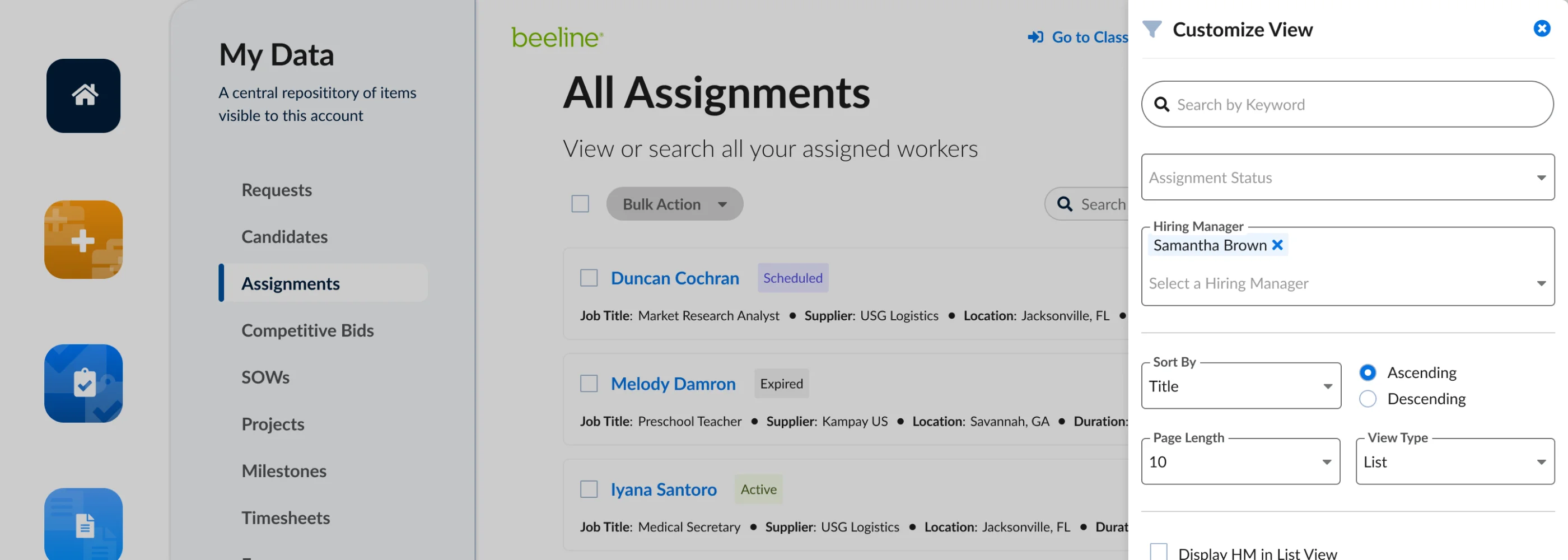
Integrated analytics dashboards. Reporting data and analytics were brought directly into HMX, connected to analytics tools for visualisation. This eliminated the primary driver of legacy screen usage: hiring managers no longer needed to leave the product to access the data they came to find. The redesigned table view below reflects those decisions in practice — stable categorical navigation on the left, sortable columns, status-at-a-glance, and a Customize View panel that preserves admin control without breaking the hiring manager's mental model.
Constraints
The key tension in this project was the customisation architecture. Enterprise clients had legitimate business reasons for controlling their own terminology — internal consistency, legal language, brand alignment. Stripping that flexibility wasn't an option and wasn't the right answer.
The solution had to operate at a structural layer, not a label layer. This required a different kind of stakeholder conversation than a typical nav redesign: I had to make the case that structural consistency and label flexibility aren't in conflict — you can give clients full control over what things are called while still giving users a reliable sense of where things live. That framing — separating structure from nomenclature — was as important as any visual or interaction decision in the project. The Customize View panel below illustrates the tension directly: admins retain full control over filters, sort order, and view type — but the underlying data entity structure stays stable regardless of how they configure it.
Validation
Low-fidelity prototypes went to stakeholders early to confirm alignment and viability before higher fidelity was built. An unmoderated Maze usability study then tested the redesigned navigation at higher fidelity. Qualitative findings confirmed that users could locate their target data — including analytics and reporting — without resorting to workarounds, across different client configurations in the test scenarios.
No quantitative benchmark existed before the project, so the Maze data is directional rather than comparative. The adoption metrics tracked post-launch showed the expected movement: navigation workarounds decreased and product adoption rates improved.
Impact
Navigation workarounds declined — support contacts for navigation-related queries decreased after launch. Hiring managers were completing tasks within HMX that had previously required leaving the product entirely. The mobile-first redesign unlocked on-the-go usage that the previous layout had blocked.
Reflection
The most important lesson from this project was the distinction between label clarity and structural clarity. The initial instinct — mine and the team's — was to focus on confusing terminology. The labels were inconsistent, the names were unintuitive, fix the names. But that diagnosis was wrong. The labels were inconsistent because the architecture allowed clients to change them — and no amount of label work would survive the next admin reconfiguration.
Solving at the structural level was a more durable fix, but it required a harder sell. It's easier to point at a confusing label and say "change this" than to make the case that the entire navigation model needs to be rebuilt around entity types. That argument took evidence — the support contact data, the heuristic evaluation, the PM research — and it took framing the problem in terms of client value ("you can still customise everything") rather than design purity.
If I were starting again, I'd instrument the product earlier. The absence of a quantitative baseline meant the Maze study could only confirm direction, not magnitude. Even a lightweight analytics pass before kickoff would have given us a much stronger before/after story.
Let's Connect
Like what you see?
Let's talk about what we could build together.